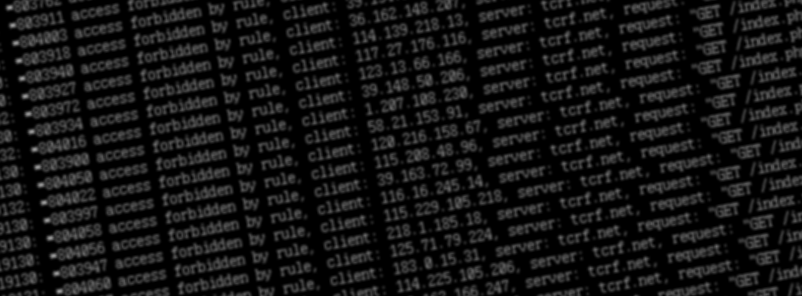
There’s been something of an epidemic of malicious bots on the internet these days. You may have seen a post recently titled “Please stop externalizing your costs directly into my face“, or “FOSS infrastructure is under attack by AI companies“. Those are all happening to us, too. Surprise.
I run a website called The Cutting Room Floor, a wiki about cut/unused content in games. The server has been getting hammered by a whole host of LLM scrapers, malicious bots, and other problems.
The first type, LLM scrapers, are fairly well known at this point. They operate by simply scraping every single page of your website, as fast as possible, in the worst way possible, ignoring flags like “noindex” and “nofollow”. The naïve part comes into play because many sites, especially dynamically generated pages like wikis and code repositories, have very deep links to all sorts of historical views of pages — old versions, comparisons between arbitrary old versions, statistics and info pages… A scraper bot will just grab all of those without care of their value (or cost).
The LLM scrapers largely come from cloud providers, especially low-quality ones that are rife with abuse. If you block their scraping attempts, they will simply start up a new VM on their provider of choice, do more scrapes until they’re caught, repeat ad infinitum, until you give up and black hole the entirety of PureVoltage/OVH/DigitalOcean/Amazon/etc. The particularly sophisticated ones spread out their requests across multiple IP addresses in the first place, too, making identifying them much harder.
A subtype of this is the “wannabe archiver/preservationist”. You know the type: “This website is important. I should save it. I will do this by single-handedly downloading the entire website.” We’ve had these kinds of clowns, too. In a sense, it’s similar to a bank run, complete with largely just making the problem worse for everyone.
Those bots are bad, but at least they want the content of the pages, even if it is for no noble goal. Far more insidious are the straight-out DDoS bots.
The DDoS
Here’s a bit of a graph from the TCRF server, one of the analysis tools I made and use. It simply shows a running count of “how many accesses were made to the web server this second”, split across blocked accesses (403s, indicated with a “#” on the bar) and all others (indicated with “|”). This is right as one of the DDoS waves came in, and you can see things jump from TCRF’s stable “5-15/sec” to nearly 100:
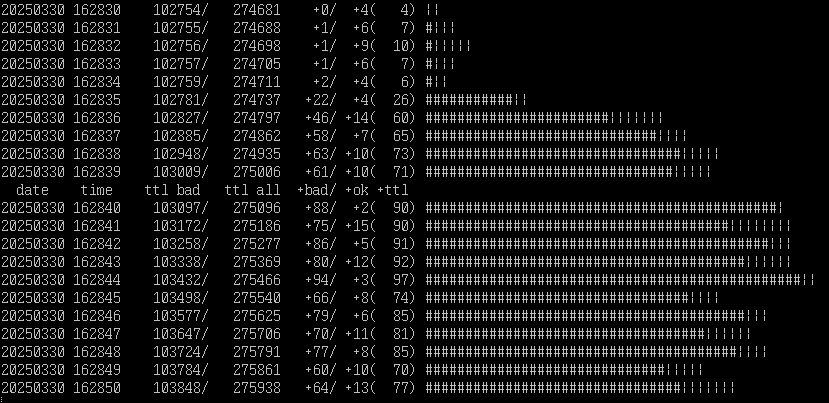
This particular DDoS has been ongoing since early January in various forms, and as far as I can tell seems to be targeted at us directly. Thousands of IP addresses, all making one or two requests, all at the same time.
These attacks typically last for a minute or two. The bots have certain pages and features that they disproportionately target: “expensive” pages to generate. For the first few months — before I’d actually pinpointed it as a DDoS — they mostly focused on making excessive calls to “Special:RecentChangesLinked“, a page that shows a page’s history and the history of every page linked to it. By simply requesting 5,000 different pages’ worth of interlinked history, the server grinds to a halt and nobody else can access a page.
When that attack was mitigated by making RecentChangesLinked login-only, The next attack has largely focused on just blasting random history / comparison pages, again with the strategy of “spend as much time executing worthless requests as possible so that nobody else can get in”. Note that almost all of these are within the same second, and from a wide variety of IP addresses, almost all Chinese-based:
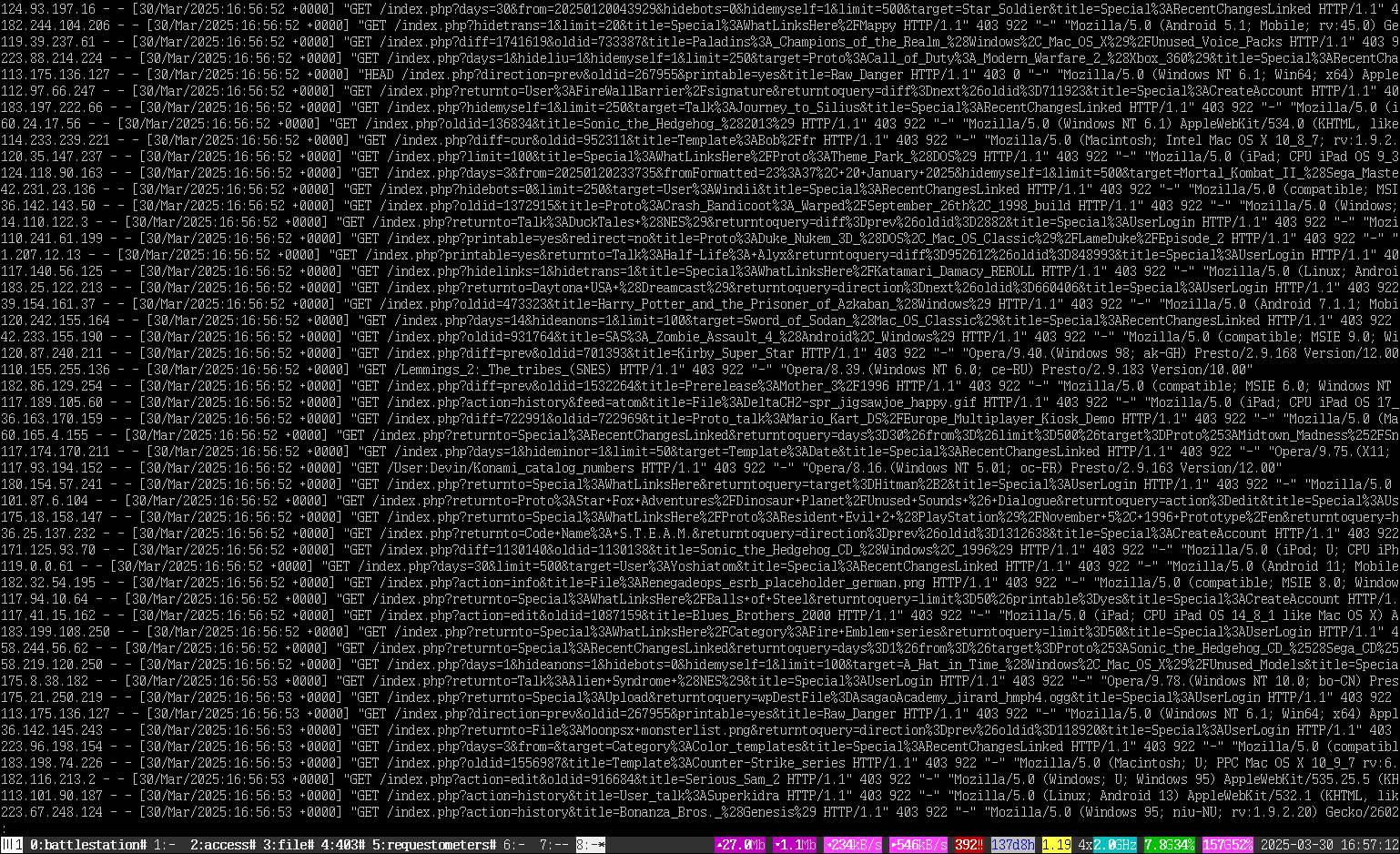
It’s not as useful to attack a basic content page, because the wiki will simply give you the cached version. So the bots go after these deep, dynamic pages to waste resources.
Stopping the insanity
Stopping the attack on the site has been an ongoing process, employing multiple methods.

One tool that cropped up recently and got remarkably popular is Anubis, a service that sits in front of your webapp and presents connecting users with a challenge. The challenge effectively requires a client to waste several seconds/minutes doing expensive-to-do but easy-to-verify math, under the idea that bots won’t waste time doing it (if they are even using a client capable of handling it). Anubis seems great, but isn’t really workable for TCRF for a few reasons:
- It requires Docker, which TCRF doesn’t use, and which I don’t want to have to learn, stand up, and add to an already-exhausting maintenance load
- It requires you to use nginx as a reverse proxy to a “web app”; TCRF uses nginx as a web server, not a web app, so there is nowhere to slot it in without standing up even more services
- It presents its challenge to everyone
If you’re setting up a modern web app, by all means, but the costs of implementing it here are too much.
Another suggestion that has cropped up is Cloudflare. Cloudflare likely needs no introduction: they’re a content-delivery-network that you place in front of your web server, and as part of their services they offer anti-DDoS protection. The problems with Cloudflare mostly stem from disagreeable politics, not wanting to rely on an external third party, and (again) having to set up something else in the middle that breaks all the workflows. And, again, I’m not the biggest fan of putting an interstitial in front of every single person.
So, what do you do?
Before analyzing the logs and determining that a lot of the abuse was coming from one particular location (China), the first step was simply to limit access to the most expensive pages. Since this is a simple PHP site, I was able to do this by just inserting a bit of magic into the index page; you might be able to see it if you go directly to one of the blocked pages in an incognito tab. It’s not the best, but it’s short, simple, and (most importantly) prevents the server from wasting additional resources on the request. Logged in users never get this message.
Your request was blocked. Try disabling any VPNs or proxies and try again. If problems persist, please get in touch via Discord (https://discord.gg/wnfBf5D) or IRC (irc.badnik.zone #tcrf, slow)
Then: block. Block block block. So far, most of the problem has come from a handful of networks, or ASNs. They use many IPs within those networks, but they’re still from that network. So: Block ’em all!
As a live example, one of thousands of the malicious IPs was from “219.142.153.182”. A quick look at ipinfo gives us little reason to be surprised: it originates in China, a common theme for these bots. So, simply take the AS number, “AS4847”, throw it into asn.ipinfo.app, and presto, a blocklist ready to drop into nginx. Do this about 20 times, and the DDoS starts to run out of networks it can abuse you from.
The full list of network blocks on TCRF is long and only getting longer, but it includes a frustrating number of Chinese-based telecoms, mobile networks, and cloud providers, especially Alibaba. Holy shit Alibaba is one of the most abusive networks I have ever seen, and I’m not lying when I say any sysadmin’s first step should be routing it to a black hole.
The advantages of all this is that, for most users, it’s completely transparent. Anyone can still use any old browser (even on Windows 98), there’s no intrusive waiting pages or CPU-melting Javascript challenges. The downsides are that innocent users can (and will) get caught up in these blocks, and since not everyone is subjected to the methods, there are ways to bypass it.
But at the end of the day, it’s extremely effective, and even with 100 requests/second, the requests being blocked means it doesn’t even cause a blip on the server.
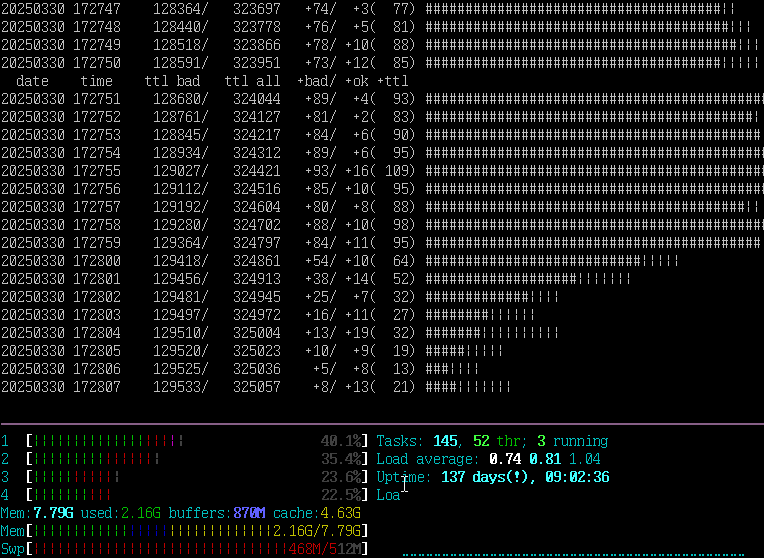
And yes, there were DDoS waves hitting the server even as I was writing about it. For now, the attacks are impotent.
Here’s a Bluesky post with a video of what the access log looks like when it happens (about 15 seconds in):
Running TCRF is a one-person operation. If you’d like to support us, please consider joining our Patreon. You can also support me directly via Ko-fi.
Hopefully, there’s a day in the future where this comes to an end.
This is all very strange. Who in the world would want to target The Cutting Room Floor for a focused DDoS attack — and one lasting for months? It just doesn’t make sense, especially when there are bigger sites that have similar functions (other wikis, The Internet Archive, et cetera) that they could be hitting. Not saying I want that — just saying… The Cutting Room Floor is pretty small potatoes compared to some places.
I wonder if Hidden Palace is getting hit, too… If so, maybe there’s a conspiracy against sites that document and report video game leaks?
Thank you for this very informative post!
What I don’t understand is: why tCRF? What on or about the site made some asshole want to DDoS it? Or do networks like Alibaba just DDoS whoever they can get their hands on for shiggles?
i am reading ths instead of doing my schoolwork. thanks. elarned more than i wouldve known in a whole year.
There is an alternative to Anubis that SourceHut switched to: https://sourcehut.org/blog/2025-05-29-whats-cooking-q2/
Also, the CSS for this blog appears to be a bit broken since I can’t see my text while typing it in because the font color is wrong.
As someone working in the industry, yeah, Alicloud just lets you put a firehose of load at anyone and anything and never responds to any requests. Unless Alicloud traffic is something you critically need for some reason, you have to block it. Saves you DDoS protection money.
I run a small wiki/forum, and as someone who checks my http logs, there sure was some comedy fom OpenAI there. Even if I was feeling generous and wanted to feed the AI motherbrain, the AI motherbrain kept making invalid requests.
It kept repeatedly requesting things like this which are articles that don’t exist, never existed and are not linked anywhere.
/wiki/articles/(Free)
/wiki/articles/(Premium_Generator)
/wiki/articles/(New_Codes)
/wiki/articles/FREE_Gift_Card_Generator_PRO_APK_(Android_Ios_App)
It kept requesting valid URLs but with a slash at the end which MediaWiki interprets as a new page name and returns not found.
It kept requesting URLs that are truncated after 20 characters for some reason.
It kept requesting random MediaWiki system pages for some reason.
It’s all very bizarre. It’s like the AI is playing a game of “the useful content is lava”.
“Anyone can still use any old browser (even on Windows 98)”
BUT
on my default user agent firefox 91 on windows 7 64 bit ultimate i got
Error code 42069. Have you updated your browser recently? Might be time
& or error 403 maybe “You are using a known-abusive user agent (browser) ”
but
i solved this with firefox 91 & a fake user agent = 128
That is a recent anti-bot change, and as you identified it works if you change your user-agent. Unfortunately bots love using random (old) user-agents, so blocking versions of FF/Chrome under v100 (about 3 years ago) cuts out a good amount of nuisance traffic.
blocking people using VPNs to avoid the corporate crap happening everywhere else on the internet is a *great* solution.
and of course you’re too much of a coward to a critical comment through, lmfao. still going to remind you every time your crap website flashes an annoying fucking page in my face tho.
You don’t need to avoid the “corporate crap” on TCRF, because TCRF does not request your browser to contact any other domains or services.
At the same time, from the VPNs that are still allowed, we’ve had to ban four more of them — all the same person evading a ban. So, you know. Assholes cause problems for everyone else, it’s true.
As for being a “coward”, well, you’re more than welcome to yell about it on your own website. But this one is mine, and if you show your whole ass, I reserve the right to refuse you.
Anyway, see ya next comment.
also, for a crap website, you sure can’t stop using it lmao
Thank you for STILL not putting a “challenge to everyone”.
I love my NoScript and I think some others do too. I don’t contribute much nowadays but still get a lot of fun browsing through the site – it’s prime time visual entertainment! (Hopefully this helps against the ratio of people that are being an ass towards you.)
Using an old version browser right now shows exactly how much the internet has become walled by Cloudflare et al. in the past 4 years, to the point where not enabling javascript/cookies or using certain privacy settings is no longer possible for most websites.
In the past month, around 3 or so websites that i frequent which had no check or used Anubis and similar checks, decided to add the dreaded Cloudflare/HCaptcha for their entire site, truly sad.
I can stomach Anubis and other ligher checks that do not treat its users like a hamster on a spinning wheel but Cloudflare/HCaptcha do use the latest and “greatest”~ js functions and web components, spoofing the user agent to get past it is futile as you will run into another error.
A year ago i saw this article because i got the version block on tcrf you just described and remembered that some sites block old agents to block bots and ask you to install a ua switcher browser addon to get past. Well, not anymore, went to tcrf, “Enable JavaScript and cookies to continue”.
I do not need anything from tcrf anymore, but please note that Cloudflare is the worst and about as damaging to its users as those bots are to your site!
So please consider Anubis, Gandalf, accounts or any other approach that does not have “system requirements” or eliminates privacy for seeing text and images, otherwise browsing your older site on archive.org becomes superior.
Unfortunately, we’ve been hit by a DDoS that isn’t capable of being solved by tools like Anubis; Xe has weighed in on it even. We’re dealing with a layer 3 attack at the network level, which has been strong enough that our host had to null-route our server’s address.
I’m not happy with having to use Cloudflare either, believe me. The reason you’re seeing that popup is because I have “Under Attack mode” on, because we’re still… under attack. Not long after I got our backup server on — with just the message saying “we’re down, we’re working on it” — it was hit with 80 million requests in one minute.
Our server normally serves about 1 million per day.
I understand the frustration, and I’m not committing to using Cloudflare forever. I don’t like it as much as you don’t. But right now, it’s either this or it’s offline for everybody.
It is more understandable if it is only temporary, but the user has no way of knowing that. From my experience once something shows the cloudflare check, it is there to stay and get worse. 2 years ago archive.is had the cloudflare check sometimes when archiving, then some months later it had it for viewing any archived page, then it had it for everything. Right now you can only view their archive/about pages without it.
On other hand archive.org never had any check somehow, even though it is the bigger site, while ghostarchive which is much smaller than both only started having an optional captcha queue to skip the overloaded regular one.
As for your site, you took the lazy approach by having the plain cloudflare check to view anything, no custom page, no extra info, nothing. How am i supposed to even know the site is under attack and the check temporary? Maybe by checking your social media on daily basis?
In any case, if doing an Anubis check on nearly every page like how Invidious and similar sites do just fine with is not an option because your server setup/the attack is to strong maybe the problem is having only one option and lacking any alternative to begin with.
Yesterday i made that post because i was so frustrated when i tried to go to rpgmaker.net where i have an account since 2022 and being slammed with the cloudflare check despite storing login cookies, complete nonsense!
Which is sad because the account route is probably the most sure way of letting your users through without abusing them.
Ever wondered how Google and others handle their users by accountifying? You and the rest of the smaller sites could do the same. Have a notice on the CF check page, give out a throwaway email where i’m supposed to send a message asking permission, then you send me a login token and a different account creation page where i make an account using that token, then i can view tcrf using accounts/cookies instead. If bots get past that, you ban the account, while veteran users get priority. I have no idea why nobody has figured this out yet.
I’m not sure what you want. The attack took down our server, it took down the backup server I put up to show a downtime message, it took down the backup backup server. When I tried to link it on my homepage, they knocked that offline for a few minutes, too (and how would anyone find that?)
I told you that Anubis and other tools would not help at all in this instance. Even if we had them, this attack overwhelmed the network infrastructure over what we had.
If you want to be frustrated at someone, take it out on the person forcing us to use Cloudflare. I’d love to not have to use them. I’d love to have never needed to reroute our server. Unfortunately, someone else decided better.